
• Visitors can check out the Forum FAQ by clicking this link. You have to register before you can post: click the REGISTER link above to proceed. To start viewing messages, select the forum that you want to visit from the selection below. View our Forum Privacy Policy.
  • Want to receive the latest contracting news and advice straight to your inbox? Sign up to the ContractorUK newsletter here. Every sign up will also be entered into a draw to WIN £100 Amazon vouchers!

Glitch during build of new PC

Collapse
X
  •  
  • Filter
  • Time
  • Show
Clear All
new posts

    Glitch during build of new PC

    We've ought some bits from Overclockers to build a basic but useful PC.

    We intend putting XP onto it before upgrading to Win 8.

    So Mr C has built it (he's fixed the old one a few times before and knows his way around a chassis) and everything is nicely in place.

    When trying to install XP it's crashing with the BSOD suggesting that we check the disk drive. Or maybe it's because it's loading old drivers that the motherboard doesn't recognise.

    Which leaves us with a bit of a problem with the motherboard (we think). It's a basic Asrock FM2A55M-DGS (AMD Athlon X4 740 3.20GHz processor) motherboard, which may not be compatible with XP.

    We've got the XP drivers downloaded, but it looks as if we have to put the old floppy drive in () because it doesn't recognise the usb stick onto which I've loaded the drivers.

    Although this may not work because of previously mentioned incompatibility. Or maybe there is a problem with the SATA hard drive, we'll format it and see (though I think it's the drivers).

    Feel free to offer suggestions or just laugh at me. I'll post the next installment once we've plugged the floppy in.

    This is the trusty old PC we are replacing.
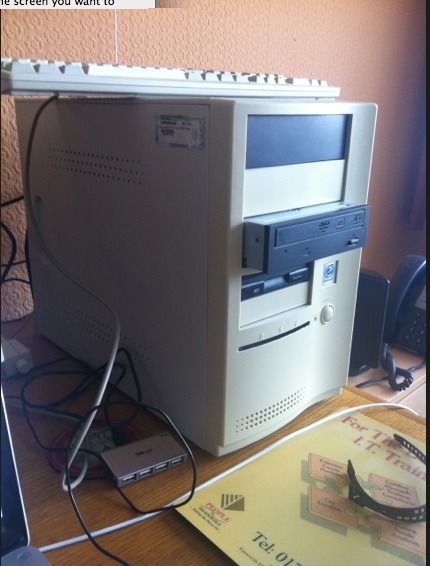


    (This chassis is from the one before last, Mr C had to reuse because the previous one was a technical design dead-end and couldn't be rebuilt with new type of PSU.)
    "I can put any old tat in my sig, put quotes around it and attribute to someone of whom I've heard, to make it sound true."
    - Voltaire/Benjamin Franklin/Anne Frank...

    #2
    Can't you just install windows 8?
    merely at clientco for the entertainment

    Comment


      #3
      IIRC XP lacks native support for AHCI / RAID that modern chipset SATA controllers use. There are a couple of ways around this

      a) switch the controller mode to legacy IDE in the BIOS. XP ships with drivers that support this.
      b) download the drivers, put them on a floppy disk and press F6 at the appropriate place in the install (you're doing this I see)
      c) use a utility (I forget the name) to create a custom XP install disk with the drivers on
      While you're waiting, read the free novel we sent you. It's a Spanish story about a guy named 'Manual.'

      Comment


        #4
        Originally posted by eek View Post
        Can't you just install windows 8?
        Mr C had just opened the Windows 8 Upgrade package before we realised there was a problem eek.
        "I can put any old tat in my sig, put quotes around it and attribute to someone of whom I've heard, to make it sound true."
        - Voltaire/Benjamin Franklin/Anne Frank...

        Comment


          #5
          Originally posted by doodab View Post
          IIRC XP lacks native support for AHCI / RAID that modern chipset SATA controllers use. There are a couple of ways around this

          a) switch the controller mode to legacy IDE in the BIOS. XP ships with drivers that support this.
          b) download the drivers, put them on a floppy disk and press F6 at the appropriate place in the install (you're doing this I see)
          c) use a utility (I forget the name) to create a custom XP install disk with the drivers on
          We'll be doing b) later today.

          Thanks doodab, does anyone know the name of this utility?
          "I can put any old tat in my sig, put quotes around it and attribute to someone of whom I've heard, to make it sound true."
          - Voltaire/Benjamin Franklin/Anne Frank...

          Comment


            #6
            nLite - Deployment Tool for the bootable Unattended Windows installation - About

            Also I seem to remember I ended up installing in IDE mode and switching later. You have to force install the drivers then switch the mode in the bios.
            While you're waiting, read the free novel we sent you. It's a Spanish story about a guy named 'Manual.'

            Comment


              #7
              Originally posted by doodab View Post
              nLite - Deployment Tool for the bootable Unattended Windows installation - About

              Also I seem to remember I ended up installing in IDE mode and switching later. You have to force install the drivers then switch the mode in the bios.
              Excellent, wondered about switching aftwards (post Win 8 upgrade).

              Ta doodab, I'll let you know how it goes...
              "I can put any old tat in my sig, put quotes around it and attribute to someone of whom I've heard, to make it sound true."
              - Voltaire/Benjamin Franklin/Anne Frank...

              Comment


                #8
                You can also do fresh installs of Win8 from an upgrade disk, have done this with Win7 and it has worked fine, looks like you can do with Win8 as well:
                Clean Install with Windows 8 Upgrade

                Comment


                  #9
                  Remember if this is a new HDD it will be a 4k sector one not the old 512k sector. XP won't align the sectors properly and the performance will suck (as 4k drives were not out when XP was).

                  Format the drive before installing XP making sure you do it to the 4k sectors.

                  Comment


                    #10
                    Will do sockpuppet.

                    @Admin: but don't you need a legal version of a full OS first to overlay the Win 8 upgrade?
                    "I can put any old tat in my sig, put quotes around it and attribute to someone of whom I've heard, to make it sound true."
                    - Voltaire/Benjamin Franklin/Anne Frank...

                    Comment

                    Working...
                    X


