That's a point! I post a link to an interactive Find Ossie picture and the next day they do. Spooky! Wahee, look out for a blow up Brownstuff picture.
PS I share a birthday with Nostradamus, is this coincidence?
- Visitors can check out the Forum FAQ by clicking this link. You have to register before you can post: click the REGISTER link above to proceed. To start viewing messages, select the forum that you want to visit from the selection below. View our Forum Privacy Policy.
- Want to receive the latest contracting news and advice straight to your inbox? Sign up to the ContractorUK newsletter here. Every sign up will also be entered into a draw to WIN £100 Amazon vouchers!
Reply to: Google magnifier
Collapse
You are not logged in or you do not have permission to access this page. This could be due to one of several reasons:
- You are not logged in. If you are already registered, fill in the form below to log in, or follow the "Sign Up" link to register a new account.
- You may not have sufficient privileges to access this page. Are you trying to edit someone else's post, access administrative features or some other privileged system?
- If you are trying to post, the administrator may have disabled your account, or it may be awaiting activation.
Logging in...
Previously on "Google magnifier"
Collapse
-
Cheers. If that's how it's done I should be able to adapt my Osama example fairly easily. The same technique can also be used for other effects like a flashlight in a dark room or revealing various details as you mention.
Leave a comment:
-
Yep, the magnified images are separate graphics from the small one rather than just zooming it, and the animations are individual absolutely-positioned animated GIFS, e.g.Originally posted by TimberWolf View PostThe magnified image also contains animations (check out the clock, fountain or dancer) and has detail not present in the static image (e.g. the birds in the tree).
- Train whistle:

- Twirly woman:

- Fountain:

Leave a comment:
- Train whistle:
-
The magnified image also contains animations (check out the clock, fountain or dancer) and has detail not present in the static image (e.g. the birds in the tree).
Leave a comment:
-
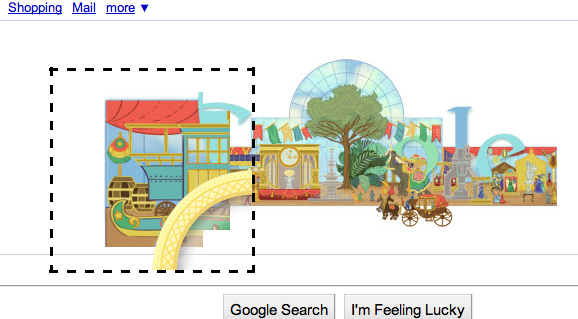
The container for the magnifier is rectangular, or to be precise 200px square, and its background colour is transparent. Within that is the image for the circular rim of the magnifier, which is a PNG with alpha transparency:

The background images are then positioned absolutely relative to the container in a cross formation such that their rectangular edges are hidden behind the non-transparent parts of the rim.
Here's a screenshot (taken in Safari, which is a Webkit-based browser) in which I've applied a black dashed outline to the outermost container, and given the circular rim 100px top and left margins, thereby pushing it down and to the right:
and here's one also with the dashed outline but with the rim made almost transparent, so you can see how the images are positioned behind it:
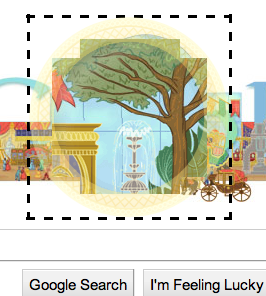
FWIW, there are a few CSS3 techniques being used which only work on WebKit browsers (such as Safari and Chrome) or on recent builds of Firefox (maybe in IE 10 beta too, I'm not sure). These are mainly just providing nice transitions and such; for example the magnifier zooms out from very small to full size and from transparent to opaque in a smooth transition of 400ms duration.
Leave a comment:
-
Cheers TL, I did have a look, it's just got a wierd link. It could be just one or more rectangles under that as you say.
Leave a comment:
-
Assuming it's Javascript, I'd guess you can see the source code if you look.
But it might be something to do with how the circular viewport has a chunky border, which looks exactly the right size to be have a square viewport lurking beneath it.
Leave a comment:
-
Google magnifier
On today's google banner, anniversary of world trade fair, there is a round magnifier which I would like to do (without Flash or Silverlight etc). I know how to do a rectangular magnifier in jscript but not a round one.
Unless it's just a set of overlapping rectangles anyone know how its done?
PS Click to find Osama Bin Laden at the jumble sale.
Where's Ossie?Tags: None
- Home
- News & Features
- First Timers
- IR35 / S660 / BN66
- Employee Benefit Trusts
- Agency Workers Regulations
- MSC Legislation
- Limited Companies
- Dividends
- Umbrella Company
- VAT / Flat Rate VAT
- Job News & Guides
- Money News & Guides
- Guide to Contracts
- Successful Contracting
- Contracting Overseas
- Contractor Calculators
- MVL
- Contractor Expenses
Advertisers
Contractor Services
CUK News
- Business expenses: What IT contractors can and cannot claim from HMRC Jan 30 08:44
- April’s umbrella PAYE risk: how contractors’ end-clients are prepping Jan 29 05:45
- How EV tax changes of 2025-2028 add up for contractor limited company directors Jan 28 08:11
- Under the terms he was shackled by, Ray McCann’s Loan Charge Review probably is a fair resolution Jan 27 08:41
- Contractors, a £25million crackdown on rogue company directors is coming Jan 26 05:02
- How to run a contractor limited company — efficiently. Part one: software Jan 22 23:31
- Forget February as an MSC contractor seeking clarity, and maybe forget fairness altogether Jan 22 19:57
- What contractors should take from Honest Payroll Ltd’s failure Jan 21 07:05
- HMRC tax avoidance list ‘proves promoters’ nothing-to-lose mentality’ Jan 20 09:17
- Digital ID won’t be required for Right To Work, but more compulsion looms Jan 19 07:41

Leave a comment: