
Originally posted by CoolCat
View Post
-
Did they ask you for a backup e-mail address when you did the registration? If yes, you should check out the e-mail that you gave. Or if you've sent e-mails from it you can try and track it down. Otherwise, you should visit the support page that was linked above. -
sadly that registry entry is blank for me, so still no nearer finding out the email that office is registered to...Leave a comment:
-
Looks like you've found your email address. Try signing into the office website and follow the forgot your password link.Originally posted by xoggoth View PostLeave a comment:
-
Not sure if it's anything to do with Office but a regedit search did find a folder:
Computer\HKEY_USERS\.DEFAULT\Software\Microsoft\Id entityCRL\StoredIdentities\<xoggoth>@btinternet.co mLeave a comment:
-
I have Office Pro 2016 installed and when I launch Word, my name, photo and email address are in the top right corner.Leave a comment:
-
You have to log in with your email. Only 1st two letters is shown on mine but maybe should jog the OP's memory.Leave a comment:
-
If you have the subscription version then just open Word and go File > Account and it tells you on the right hand side of the page what the account is, including a link to manage the account.
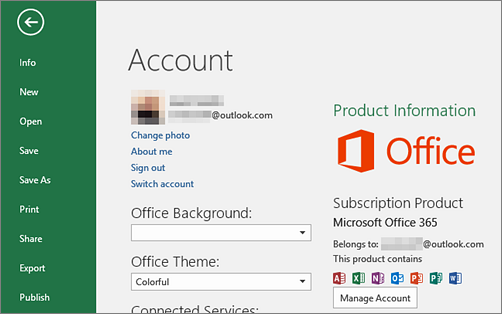
(Note - sometimes the user information and account information can / will be different. They are on mine at the moment.)Leave a comment:
-
Leave a comment:
-
Did you pay with Paypal? Maybe you could contact MS with the PayPal Billing ID on your payment record.
Seems to work for Netflix anyway:
https://help.netflix.com/en/node/17491Leave a comment:
-

Microsoft Professional 2016 Installed, what is email address its registered to?
Microsoft Professional 2016 Installed
So quite a while ago I installed MS Office, I had to create a Microsoft email account to do so, noted down the password of that account (which I generated just for that purpose), and never thought any more of it.
Now it comes time to revisit this I cannot remember the name of the email address I used to register Office with. I had assumed I would be able to tell from Office, such as File->Account->Product Info but horror of horrors it doesn’t show the email address the product is registered to (like its says it will helpfully but incorrectly on the Microsoft help site).
Any ideas how to find out the email address office 2016 is registered to? Is it in the registry somewhere? Or where?




Leave a comment: