
• Visitors can check out the Forum FAQ by clicking this link. You have to register before you can post: click the REGISTER link above to proceed. To start viewing messages, select the forum that you want to visit from the selection below. View our Forum Privacy Policy.
  • Want to receive the latest contracting news and advice straight to your inbox? Sign up to the ContractorUK newsletter here. Every sign up will also be entered into a draw to WIN £100 Amazon vouchers!

You are not logged in or you do not have permission to access this page. This could be due to one of several reasons:

  • You are not logged in. If you are already registered, fill in the form below to log in, or follow the "Sign Up" link to register a new account.
  • You may not have sufficient privileges to access this page. Are you trying to edit someone else's post, access administrative features or some other privileged system?
  • If you are trying to post, the administrator may have disabled your account, or it may be awaiting activation.

Previously on "Microsoft Professional 2016 Installed, what is email address its registered to?"

Collapse

  • pink
    replied
    Originally posted by CoolCat View Post
    Microsoft Professional 2016 Installed
    So quite a while ago I installed MS Office, I had to create a Microsoft email account to do so, noted down the password of that account (which I generated just for that purpose), and never thought any more of it.
    Now it comes time to revisit this I cannot remember the name of the email address I used to register Office with. I had assumed I would be able to tell from Office, such as File->Account->Product Info but horror of horrors it doesn’t show the email address the product is registered to (like its says it will helpfully but incorrectly on the Microsoft help site).
    Any ideas how to find out the email address office 2016 is registered to? Is it in the registry somewhere? Or where?
    Did they ask you for a backup e-mail address when you did the registration? If yes, you should check out the e-mail that you gave. Or if you've sent e-mails from it you can try and track it down. Otherwise, you should visit the support page that was linked above.

    Leave a comment:


  • CoolCat
    replied
    sadly that registry entry is blank for me, so still no nearer finding out the email that office is registered to...

    Leave a comment:


  • LondonManc
    replied
    Originally posted by xoggoth View Post
    Not sure if it's anything to do with Office but a regedit search did find a folder:

    Computer\HKEY_USERS\.DEFAULT\Software\Microsoft\Id entityCRL\StoredIdentities\<xoggoth>@btinternet.co m
    Looks like you've found your email address. Try signing into the office website and follow the forgot your password link.

    Leave a comment:


  • xoggoth
    replied
    Not sure if it's anything to do with Office but a regedit search did find a folder:

    Computer\HKEY_USERS\.DEFAULT\Software\Microsoft\Id entityCRL\StoredIdentities\<xoggoth>@btinternet.co m

    Leave a comment:


  • ladymuck
    replied
    I have Office Pro 2016 installed and when I launch Word, my name, photo and email address are in the top right corner.

    Leave a comment:


  • CoolCat
    replied
    Originally posted by xoggoth View Post
    You have to log in with your email. Only 1st two letters is shown on mine but maybe should jog the OP's memory.
    nope on mine it shows none of the email address at all...

    Leave a comment:


  • CoolCat
    replied
    Originally posted by DeludedKitten View Post
    If you have the subscription version then just open Word and go File > Account and it tells you on the right hand side of the page what the account is, including a link to manage the account.
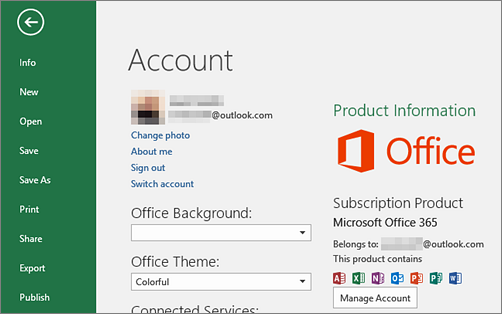


    (Note - sometimes the user information and account information can / will be different. They are on mine at the moment.)
    bought as a one off licence not subscription

    Leave a comment:


  • CoolCat
    replied
    Originally posted by LondonManc View Post
    it would be if what is suggested worked, which it doesnt

    just returns with a screen not showing email address...

    Leave a comment:


  • xoggoth
    replied
    You have to log in with your email. Only 1st two letters is shown on mine but maybe should jog the OP's memory.

    Leave a comment:


  • DeludedKitten
    replied
    If you have the subscription version then just open Word and go File > Account and it tells you on the right hand side of the page what the account is, including a link to manage the account.


    (Note - sometimes the user information and account information can / will be different. They are on mine at the moment.)

    Leave a comment:


  • LondonManc
    replied
    Is this page any help?

    https://support.office.com/en-us/art...6-bc63ee2425a8

    Leave a comment:


  • xoggoth
    replied
    Did you pay with Paypal? Maybe you could contact MS with the PayPal Billing ID on your payment record.

    Seems to work for Netflix anyway:

    https://help.netflix.com/en/node/17491

    Leave a comment:


  • Microsoft Professional 2016 Installed, what is email address its registered to?

    Microsoft Professional 2016 Installed
    So quite a while ago I installed MS Office, I had to create a Microsoft email account to do so, noted down the password of that account (which I generated just for that purpose), and never thought any more of it.
    Now it comes time to revisit this I cannot remember the name of the email address I used to register Office with. I had assumed I would be able to tell from Office, such as File->Account->Product Info but horror of horrors it doesn’t show the email address the product is registered to (like its says it will helpfully but incorrectly on the Microsoft help site).
    Any ideas how to find out the email address office 2016 is registered to? Is it in the registry somewhere? Or where?
Working...
X


